Migrate from MongoDB Atlas
40 minIntermediate
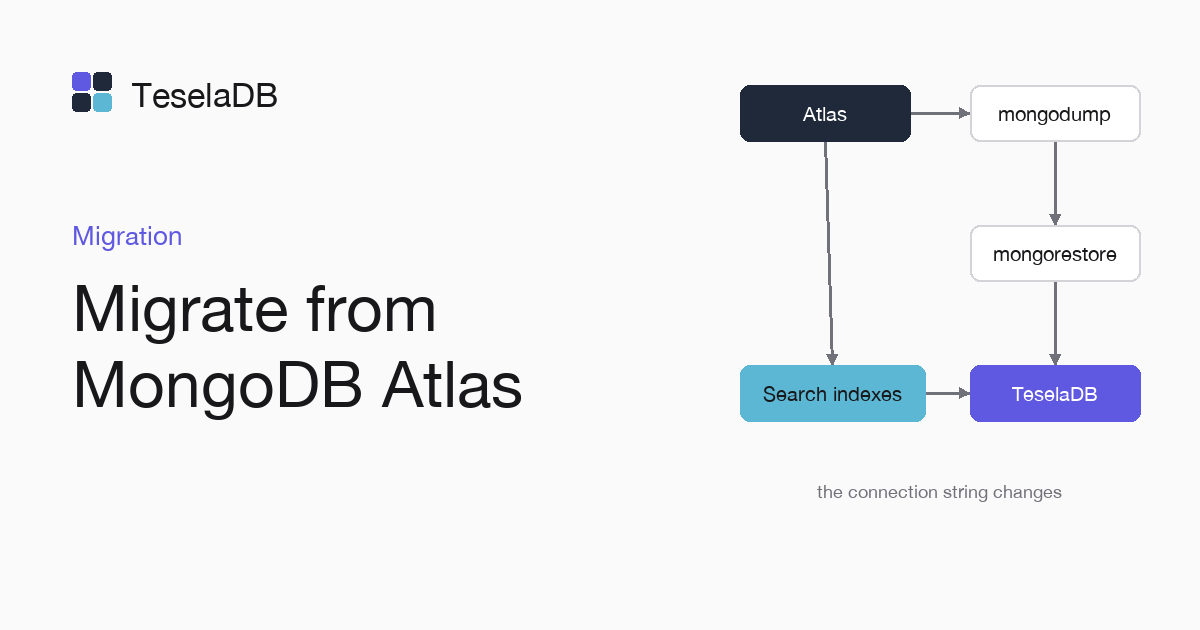
Moving an Atlas database to your TeselaDB cluster, with its search indexes, ends with a change to the connection string.
Migrating from Atlas uses the same tools as from MongoDB: mongodump with the Atlas mongodb+srv string and
mongorestore against TeselaDB. What mongodump does not copy is the search indexes, so you note them first and create
them again at the end.
What you will build
The Atlas shop database copied into your TeselaDB cluster with its regular indexes and its search indexes, and at
the end your application pointing to the new cluster.
Requirements
- Docker and
mongosh. - The MongoDB Database Tools, with
mongodumpandmongorestore. - To migrate your own Atlas, a user with read permission on the database and your machine's IP in the Atlas access list.
Set up the environment
docker run -d --name teseladb -p 27017:27017 viuzi/teseladb:latest \
  start --dbpath /data --bind_ip 0.0.0.0
until docker logs teseladb 2>&1 | grep -q '^ready'; do sleep 1; done
ROOT_PASSWORD=$(docker exec teseladb cat /data/root-credentials.txt | sed -n 's/^password=//p')
docker cp teseladb:/data/pki/ca.pem ./ca.pem
export TESELADB_URI="mongodb://root:$ROOT_PASSWORD@127.0.0.1:27017/?tls=true&tlsCAFile=./ca.pem&authSource=admin"
mongosh "$TESELADB_URI" --quiet --eval 'db.runCommand({ ping: 1 }).ok'
docker run -d --name atlas-origen -p 27018:27017 mongodb/mongodb-atlas-local:7.0.41
until mongosh "mongodb://127.0.0.1:27018/?directConnection=true" --quiet --eval 1 >/dev/null 2>&1; do sleep 2; done
mongosh "mongodb://127.0.0.1:27018/shop?directConnection=true" --quiet --eval 'db.products.insertMany([{ name: "red chair", price: 40 }, { name: "oak table", price: 120 }, { name: "folding chair", price: 25 }])'
until mongosh "mongodb://127.0.0.1:27018/shop?directConnection=true" --quiet \
  --eval 'db.products.createSearchIndex("default", { mappings: { dynamic: true } })' >/dev/null 2>&1; do sleep 3; done
export ATLAS_URI="mongodb://127.0.0.1:27018/shop?directConnection=true"
The first container starts TeselaDB in secure mode and leaves in TESELADB_URI a string as root, which is allowed to
restore. Both servers run in Docker. The second starts the local Atlas image on port 27018 with three products and a search index. The last line leaves its string in ATLAS_URI. The search service of that image answers a few seconds after the database, which
is why the index creation repeats until it works. To migrate your Atlas, put its mongodb+srv:// string with your user
in ATLAS_URI.
1. Note the search indexes
mongosh "$ATLAS_URI" --quiet --eval 'printjson(db.products.getSearchIndexes().map((index) => ({ name: index.name, definition: index.latestDefinition })))'Save the definition of each search index of each collection, because mongodump does not export them. With the test
database, the command prints the default index with mappings: { dynamic: true }.
2. Export from Atlas
mongodump --uri "$ATLAS_URI" --gzip --archive=shop.gz3. Import into TeselaDB
mongorestore --uri "$TESELADB_URI" --gzip --archive=shop.gzmongorestore creates the regular indexes. Atlas features that are not MongoDB ones, such as Atlas triggers, do not
travel in the archive, because mongodump only reads what the database stores and those features live in the Atlas service around it.
4. Create the search indexes again
mongosh "$TESELADB_URI" --quiet --eval 'db.getSiblingDB("shop").products.createSearchIndex("default", { mappings: { dynamic: true } })'Create each search index again in TeselaDB with the definition you noted in step 1, as the command above does for the
default index of products with dynamic mappings.
Try it
mongosh "$ATLAS_URI" --quiet --eval 'db.products.countDocuments()'
mongosh "$TESELADB_URI" --quiet --eval 'db.getSiblingDB("shop").products.countDocuments()'
mongosh "$TESELADB_URI" --quiet --eval 'db.getSiblingDB("shop").products.aggregate([{ $search: { text: { query: "chair", path: { wildcard: "*" } } } }, { $limit: 3 }]).toArray()'
The counts of each collection must match in Atlas and in TeselaDB. A search returns results as soon as its index has been built. With the test database, the last command returns both chairs. When everything matches, change your application's connection string to the TeselaDB cluster's one, with its nodes, its CA and a user of its own for the application.
Clean up
Delete the export archive once the data is in TeselaDB, because it holds all your data unencrypted. If you followed the guide with the test containers, remove them too, with the CA:
rm shop.gz
docker rm -f teseladb atlas-origen
rm ca.pem
Next steps
- Verify a migration, with sums and hashes per collection.
- Search indexes, with what each definition accepts.