A live dashboard with change streams
30 minIntermediate
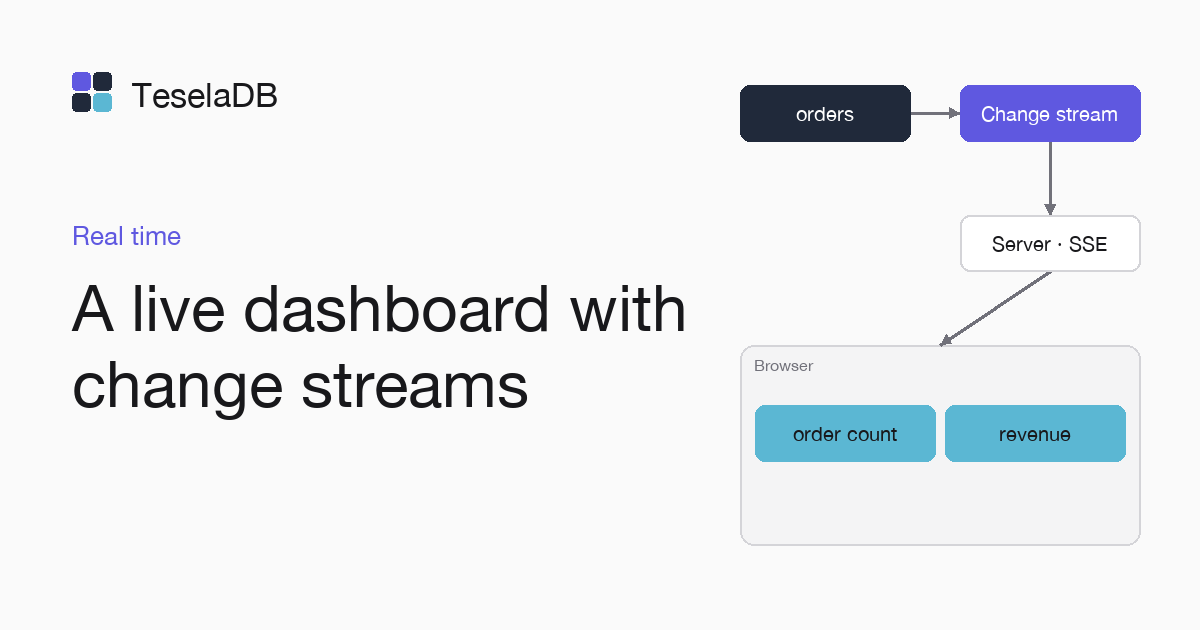
A browser dashboard with the number of orders and the revenue, updated as soon as each order comes in.
A dashboard that asks the database every few seconds runs queries even when nothing changes. With a change stream, the server knows when an order comes in and only then recomputes the totals and sends them to the connected browsers.
What you will build
A Node.js server on port 3000 that sends the number of orders and the revenue with Server-Sent Events to an HTML page, which shows them and updates with each new order.
Requirements
- Node.js 18 or later.
- Docker and
mongosh, to start TeselaDB on your machine and look at the data.
Set up the environment
docker run -d --name teseladb -p 27017:27017 viuzi/teseladb:latest \
  start --dbpath /data --insecure --insecure-allow-remote --bind_ip 0.0.0.0
export TESELADB_URI="mongodb://127.0.0.1:27017/shop"
mongosh "$TESELADB_URI" --quiet --eval 'db.runCommand({ ping: 1 }).ok'
mkdir dashboard && cd dashboard && npm init -y && npm install mongodb
The container starts a TeselaDB node without TLS or users, which is enough to follow the guide on your machine. Once mongosh answers 1, the node takes connections. TESELADB_URI points at that node and the shop database; in a production cluster the string carries TLS and a user, as Connect your application explains. The last line creates the program's folder with the mongodb package installed.
1. The server
Save it as dashboard.mjs. It serves the page at / and, at /totals, each browser gets the totals when it connects and again
with each insert into orders:
import { readFileSync } from "node:fs";
import { createServer } from "node:http";
import { MongoClient } from "mongodb";

const client = new MongoClient(process.env.TESELADB_URI);
const orders = client.db("shop").collection("orders");
const page = readFileSync(new URL("./dashboard.html", import.meta.url));
const listeners = new Set();

async function totals() {
  const [row] = await orders
    .aggregate([{ $group: { _id: null, orders: { $sum: 1 }, revenue: { $sum: "$total" } } }])
    .toArray();
  return { orders: row?.orders ?? 0, revenue: row?.revenue ?? 0 };
}

// The page at /, and at /totals one open connection per browser that gets the totals as Server-Sent Events.
createServer(async (req, res) => {
  if (req.url !== "/totals") {
    res.writeHead(200, { "content-type": "text/html; charset=utf-8" });
    return res.end(page);
  }
  res.writeHead(200, { "content-type": "text/event-stream", "cache-control": "no-cache" });
  res.write(`data: ${JSON.stringify(await totals())}\n\n`);
  listeners.add(res);
  req.on("close", () => listeners.delete(res));
}).listen(3000);

for await (const change of orders.watch([{ $match: { operationType: "insert" } }])) {
  const data = `data: ${JSON.stringify(await totals())}\n\n`;
  for (const res of listeners) res.write(data);
}
2. The page
Save it as dashboard.html, next to dashboard.mjs. EventSource keeps the connection open and reconnects on its own if it drops:
<p>Orders: <strong id="orders">0</strong> · Revenue: <strong id="revenue">0</strong></p>
<script>
  const events = new EventSource("/totals");
  events.onmessage = (event) => {
    const { orders, revenue } = JSON.parse(event.data);
    document.getElementById("orders").textContent = orders;
    document.getElementById("revenue").textContent = revenue;
  };
</script>
Try it
Start the server with node dashboard.mjs and open http://localhost:3000 in the browser, which shows the current totals
as soon as the page connects to /totals, and then, with the page still open, insert an order from mongosh:
db.getSiblingDB("shop").orders.insertOne({ total: 30 });Both numbers change as soon as the insert is committed, without reloading the page.
Clean up
Stop the server with Ctrl+C and close the page. There is nothing to delete, because the server stores nothing in the database. At the end, remove the container too with the last command: the node keeps its data inside, with no volume, so everything you wrote during the guide goes with it and port 27017 is free again.
docker rm -f teseladbNext steps
- Webhooks from a change stream, to notify other services.
- Change streams, with the filters and the options of
watch.