Spring Boot with Spring Data MongoDB
35 minIntermediate
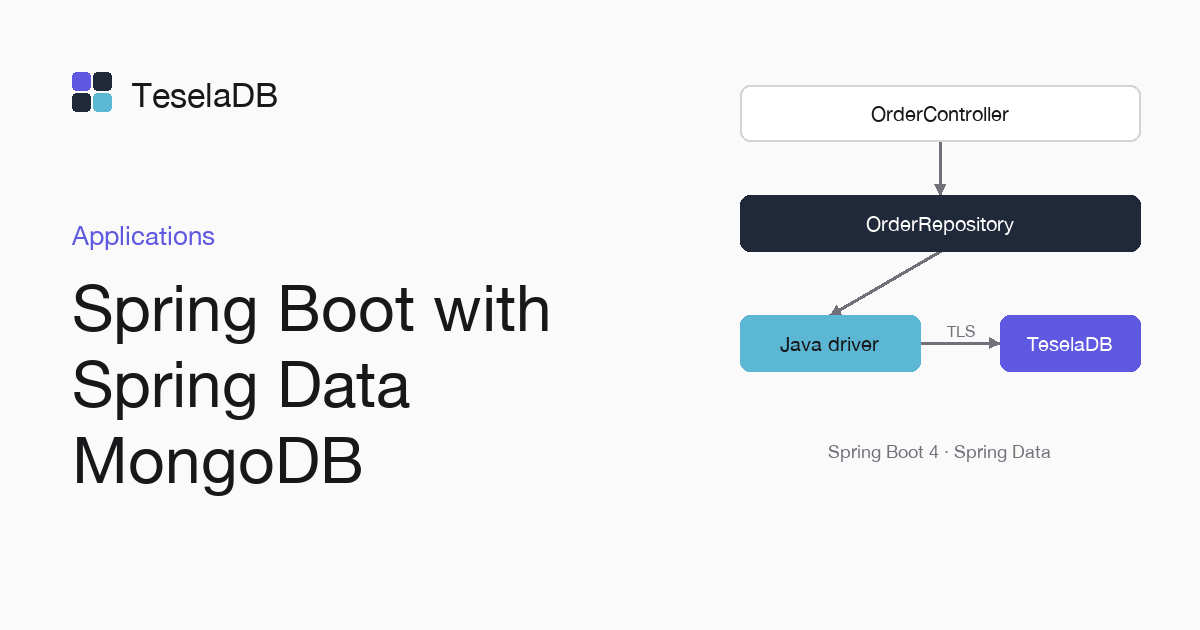
An orders API with Spring Boot 4 and a Spring Data repository that saves to TeselaDB over TLS.
Spring Data MongoDB connects to the database through the official Java driver, so your documents and your repositories work with TeselaDB unchanged. Here you set up an orders API and connect it to the cluster over TLS.
What you will build
A Spring Boot 4 application with an Order document, a repository with a derived query and a controller with
POST /orders, GET /orders/{id} and GET /orders?customer=.
Requirements
- Java 21 or later.
- Docker and
mongosh, to start TeselaDB with TLS and users on your machine.
Set up the environment
docker run -d --name teseladb -p 27017:27017 viuzi/teseladb:latest \
  start --dbpath /data --bind_ip 0.0.0.0
until docker logs teseladb 2>&1 | grep -q '^ready'; do sleep 1; done
ROOT_PASSWORD=$(docker exec teseladb cat /data/root-credentials.txt | sed -n 's/^password=//p')
docker cp teseladb:/data/pki/ca.pem ./ca.pem
export TESELADB_URI="mongodb://root:$ROOT_PASSWORD@127.0.0.1:27017/?tls=true&tlsCAFile=./ca.pem&authSource=admin"
mongosh "$TESELADB_URI" --quiet --eval 'db.runCommand({ ping: 1 }).ok'
mongosh "$TESELADB_URI"
The container starts a node in secure mode, and its first start creates the certificate authority and the root user
with a random password. The next commands wait for the ready line, take that password and the CA out and leave in
TESELADB_URI a string with TLS as root. Once mongosh answers 1, the last line opens the root session from which
you will create the application's user.
1. A user for the application
db.getSiblingDB("admin").createUser({
  user: "shop-api",
  pwd: passwordPrompt(),
  roles: [{ role: "readWrite", db: "shop" }],
});
The application does not use root but a user that only reads and writes in shop. Then, in a new terminal from the
same folder where ca.pem was left, leave its string in TESELADB_URI, replacing <password> with the one you just
typed. It carries tls=true and authSource=admin, but not tlsCAFile, because the CA reaches the application through
a Spring Boot SSL bundle:
export TESELADB_URI="mongodb://shop-api:<password>@127.0.0.1:27017/shop?tls=true&authSource=admin"2. Create the project
Generate a Maven project for Java 21 with the web and Spring Data MongoDB modules from start.spring.io, unzip it in the
orders folder and copy the CA into it, since the application reads it from its working folder:
curl -s https://start.spring.io/starter.zip -d dependencies=web,data-mongodb -d type=maven-project \
  -d javaVersion=21 -d groupId=com.example -d artifactId=orders -o orders.zip
unzip orders.zip -d orders && cd orders
cp ../ca.pem .
3. Connect it to TeselaDB
In src/main/resources/application.properties. The cluster CA goes in a Spring Boot SSL bundle, which the MongoDB
client uses as its trust store. In Spring Boot 3, the property for the string is spring.data.mongodb.uri:
spring.mongodb.uri=${TESELADB_URI}
spring.ssl.bundle.pem.teseladb.truststore.certificate=file:./ca.pem
spring.mongodb.ssl.bundle=teseladb
4. Write the document, the repository and the controller
In src/main/java/com/example/orders/. Spring Data builds the query of findByCustomer from its name:
package com.example.orders;

import java.time.Instant;
import org.springframework.data.annotation.Id;
import org.springframework.data.mongodb.core.mapping.Document;

@Document("orders")
public record Order(@Id String id, String customer, double total, Instant createdAt) {}package com.example.orders;
import java.util.List;
import org.springframework.data.mongodb.repository.MongoRepository;
public interface OrderRepository extends MongoRepository<Order, String> {
List<Order> findByCustomer(String customer);
}package com.example.orders;
import java.time.Instant;
import java.util.List;
import org.springframework.http.HttpStatus;
import org.springframework.http.ResponseEntity;
import org.springframework.web.bind.annotation.*;
@RestController
@RequestMapping("/orders")
public class OrderController {
private final OrderRepository orders;
public OrderController(OrderRepository orders) {
this.orders = orders;
}
@PostMapping
@ResponseStatus(HttpStatus.CREATED)
public Order create(@RequestBody Order order) {
return orders.save(new Order(null, order.customer(), order.total(), Instant.now()));
}
@GetMapping("/{id}")
public ResponseEntity<Order> read(@PathVariable String id) {
return ResponseEntity.of(orders.findById(id));
}
@GetMapping
public List<Order> byCustomer(@RequestParam String customer) {
return orders.findByCustomer(customer);
}
}Try it
Start the application with ./mvnw spring-boot:run. Then, in another terminal, create an order for Ana with a total of
30 and look it up by customer with GET /orders?customer=, which runs the derived query of findByCustomer in the repository:
./mvnw spring-boot:run
curl -s -X POST localhost:8080/orders -H "content-type: application/json" -d '{"customer":"Ana","total":30}'
curl -s "localhost:8080/orders?customer=Ana"
The second command returns a list with Ana's order, with its id and its creation date.
Clean up
db.getSiblingDB("shop").orders.deleteMany({ customer: "Ana" });Stop the application with Ctrl+C and run this command in mongosh to delete the test orders, all of them with Ana as
the customer. At the end, remove the container too with the command below: the node keeps its data inside, with no
volume, so the user and the orders go with it and port 27017 is free again.
docker rm -f teseladbNext steps
- Java, with the Java driver without Spring.
- ODMs and ORMs, with Mongoose and Beanie.