A SaaS with one tenant per customer
30 minAdvanced
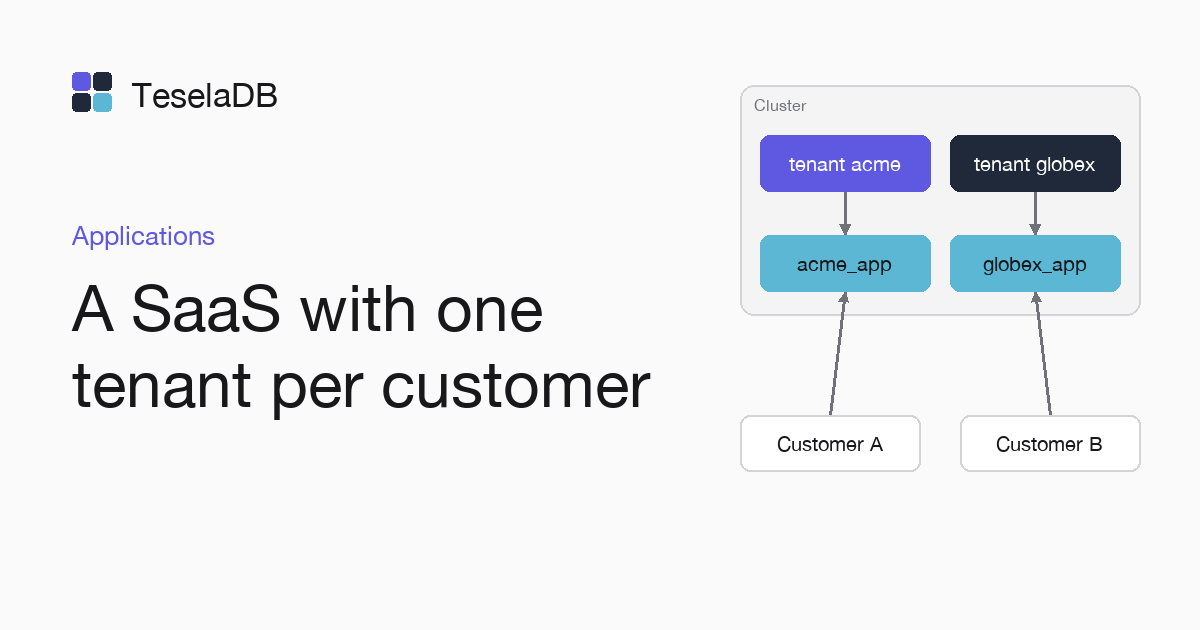
Each customer lives in its own tenant of the same cluster, with its users and its databases, without seeing the others.
A SaaS with many small customers does not need a cluster per customer, because in TeselaDB each customer can be a tenant of the same cluster. Each user belongs to one tenant. Authentication sets the tenant of the connection from its user and authorization keeps it out of another tenant's databases.
What you will build
Two tenants, acme and globex, each with a user for its application and its own shop database. Both use the same
database name and each application only sees the databases of its tenant.
Requirements
- Docker and
mongosh, to start TeselaDB with TLS and users on your machine.
Set up the environment
docker run -d --name teseladb -p 27017:27017 viuzi/teseladb:latest \
  start --dbpath /data --bind_ip 0.0.0.0
until docker logs teseladb 2>&1 | grep -q '^ready'; do sleep 1; done
ROOT_PASSWORD=$(docker exec teseladb cat /data/root-credentials.txt | sed -n 's/^password=//p')
docker cp teseladb:/data/pki/ca.pem ./ca.pem
export TESELADB_URI="mongodb://root:$ROOT_PASSWORD@127.0.0.1:27017/?tls=true&tlsCAFile=./ca.pem&authSource=admin"
mongosh "$TESELADB_URI" --quiet --eval 'db.runCommand({ ping: 1 }).ok'
mongosh "$TESELADB_URI"
The container starts a node in secure mode, and its first start creates the certificate authority and the root user
with a random password, a user of tenant 0. The next commands wait for the ready line, take that password and the CA
out and leave in TESELADB_URI a string with TLS as root. Once mongosh answers 1, the last line opens the root
session from which you will create the users of each tenant.
1. Create the tenants
docker exec teseladb teseladb admin --dbpath /data tenant create acme
docker exec teseladb teseladb admin --dbpath /data tenant create globex
Inside the container, teseladb admin takes its credentials from the PKI in /data and connects to the node's
administration port, 27200, without you publishing it on your machine. In a cluster, the same command carries --node
with the address of the administration port of any of its nodes. Either way, it
answers with the number of each new tenant.
2. Create a user in each tenant
From a tenant 0 connection, the $tenant argument makes the command work in another tenant. The user name is unique
across the cluster, so each tenant has its own:
for (const tenant of ["acme", "globex"]) {
  db.getSiblingDB("admin").runCommand({
    createUser: `${tenant}-api`,
    pwd: passwordPrompt(),
    roles: [{ role: "readWrite", db: "shop" }],
    $tenant: tenant,
  });
}
3. Connect each application with its user
Each customer connects its application with its user's string. Authentication sets the tenant, and since users live
in the admin database, the string carries authSource=admin. Replace <password> with the one you typed in step 2
and open a new session in another terminal:
export TESELADB_URI="mongodb://acme-api:<password>@127.0.0.1:27017/shop?tls=true&tlsCAFile=./ca.pem&authSource=admin"
mongosh "$TESELADB_URI"
Try it
Connected as acme-api with the string of step 3, write an order in the orders collection of shop and then list the
databases of the cluster to see which ones the application of acme can reach:
db.orders.insertOne({ customer: "Ana", total: 30 });
db.adminCommand({ listDatabases: 1, nameOnly: true });
listDatabases shows only shop, the one of acme. Connected as globex-api, the orders collection of its shop
database is empty, and on the cluster it only has listDatabases, bypassDefaultMaxTimeMS and useUUID.
Clean up
From the root session, drop the database and the user of each tenant with the same $tenant argument as in step 2.
tenant drop fails while the tenant still has databases or users, so the tenants go afterwards. At the end, remove the
container and the CA too with the last two commands; the node keeps its data inside, with no volume, and everything you
wrote goes with it:
for (const tenant of ["acme", "globex"]) {
  db.getSiblingDB("shop").runCommand({ dropDatabase: 1, $tenant: tenant });
  db.getSiblingDB("admin").runCommand({ dropUser: `${tenant}-api`, $tenant: tenant });
}docker exec teseladb teseladb admin --dbpath /data tenant drop acme
docker exec teseladb teseladb admin --dbpath /data tenant drop globex
docker rm -f teseladb
rm ca.pemNext steps
- Several tenants in one cluster, with the steps for a single tenant.
- Users and roles, to give each user only what it needs.