RAG over your documents
40 minIntermediate
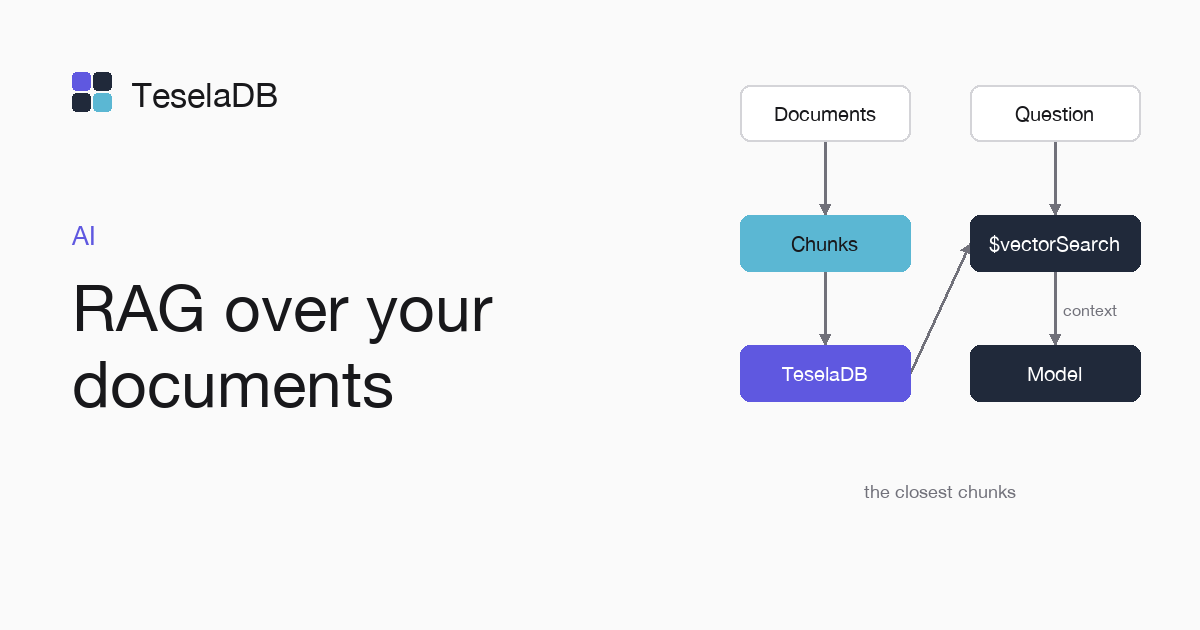
In this guide you will learn to split your documents into chunks, store them with their vector and give the model the closest ones to each question.
A language model answers better about your documents if you give it, along with the question, the chunks that cover
it. Here you store each chunk in TeselaDB with its vector and recall the closest ones with $vectorSearch to build the
text you pass to the model.
What you will build
Two Python scripts. ingest.py splits each Markdown file in docs/ into paragraphs and stores them in kb.chunks with
their vector and their source file. ask.py recalls the three paragraphs closest to a question and prints the prompt
with those paragraphs and their source.
Requirements
- Python 3.9 or later and a
docs/folder with your documents in Markdown. - Docker and
mongosh, to start TeselaDB on your machine and look at the data. - PyMongo and sentence-transformers. The examples use the
all-MiniLM-L6-v2model, with 384 dimensions:
pip install pymongo sentence-transformersSet up the environment
docker run -d --name teseladb -p 27017:27017 viuzi/teseladb:latest \
  start --dbpath /data --insecure --insecure-allow-remote --bind_ip 0.0.0.0
export TESELADB_URI="mongodb://127.0.0.1:27017/kb"
mongosh "$TESELADB_URI" --quiet --eval 'db.runCommand({ ping: 1 }).ok'
The container starts a TeselaDB node without TLS or users, which is enough to follow the guide on your machine. Once mongosh answers 1, the node takes connections. TESELADB_URI points at that node and the kb database; in a production cluster the string carries TLS and a user, as Connect your application explains.
1. Store the chunks
Save this as ingest.py. One paragraph per chunk is a simple starting point; with long documents, split by sections or
by a fixed number of words:
import os
from pathlib import Path

from pymongo import MongoClient
from pymongo.operations import SearchIndexModel
from sentence_transformers import SentenceTransformer

model = SentenceTransformer("all-MiniLM-L6-v2")
chunks = MongoClient(os.environ["TESELADB_URI"]).kb.chunks

# One chunk per paragraph, with the file it comes from and its vector.
for path in Path("docs").glob("*.md"):
    paragraphs = [p.strip() for p in path.read_text().split("\n\n") if p.strip()]
    chunks.insert_many(
        {"source": path.name, "text": text, "embedding": model.encode(text).tolist()} for text in paragraphs
    )

chunks.create_search_index(SearchIndexModel(
    name="chunks",
    type="vectorSearch",
    definition={"fields": [{"type": "vector", "path": "embedding", "numDimensions": 384, "similarity": "cosine"}]},
))
print(chunks.count_documents({}), "chunks")
2. Recall the context of a question
Save this as ask.py. The prompt asks the model to answer only from the context and to cite the file of each fact:
import os
import sys

from pymongo import MongoClient
from sentence_transformers import SentenceTransformer

model = SentenceTransformer("all-MiniLM-L6-v2")
chunks = MongoClient(os.environ["TESELADB_URI"]).kb.chunks


def context_for(question: str, limit: int = 3) -> list[dict]:
    return list(chunks.aggregate([
        {"$vectorSearch": {"index": "chunks", "path": "embedding", "queryVector": model.encode(question).tolist(),
                           "numCandidates": 100, "limit": limit}},
        {"$project": {"_id": 0, "source": 1, "text": 1}},
    ]))


question = sys.argv[1]
context = context_for(question)
prompt = "Answer only with this context and cite the source of each fact.\n\n"
prompt += "\n\n".join(f"[{c['source']}] {c['text']}" for c in context)
prompt += f"\n\nQuestion: {question}"
print(prompt)
Try it
With two files in docs/, one about adding nodes and one about draining them, store the chunks and ask, waiting a
few seconds between the two commands so the vector index that ingest.py creates finishes building before ask.py
queries it:
python ingest.py
python ask.py "how do I take a machine out of the cluster?"
The prompt starts with the paragraph of drain.md, even though the question, which asks how to take a machine out of
the cluster, does not say "drain". Pass it to the
language model you use as the user message.
Clean up
db.getSiblingDB("kb").chunks.drop();Run it from mongosh when you are done. Dropping kb.chunks also drops its vector index and leaves nothing of the test
in the kb database. At the end, remove the container too with the last command: the node keeps its data inside, with no volume, so everything you wrote during the guide goes with it and port 27017 is free again.
docker rm -f teseladbNext steps
- Semantic search with $vectorSearch, with filters and
exact. - Memory for an AI agent, to remember what each user says.