TeselaDB 0.1
With release 0.1 you have a node running in a minute. Here you see what each part does and how long it gets patches.
5 min read
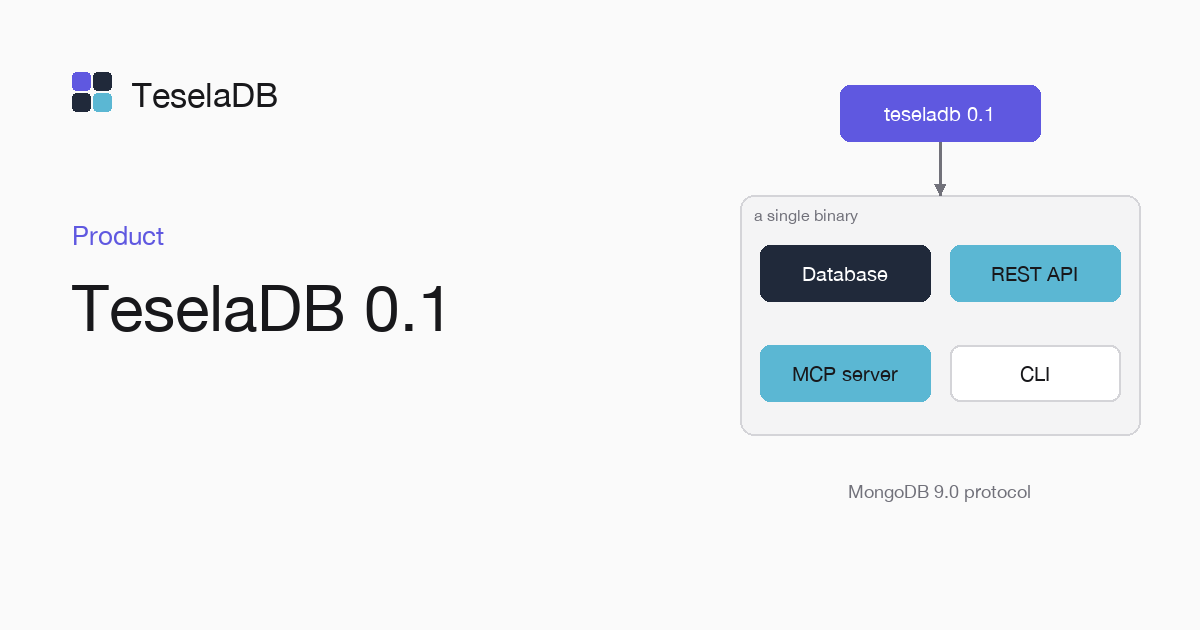
The first TeselaDB release ships as a Docker image and as a single binary for Linux x86_64, Linux aarch64 and macOS Apple Silicon. On Linux you use it in production and in development, natively or in Docker. On macOS it is for development, with no latency guarantees. Here is how to start it in a minute, what each part of the release does and how long it will get patches.
Start a node
docker run -d --name teseladb -p 27017:27017 viuzi/teseladb:latest \
  start --dbpath /data --bind_ip 0.0.0.0
until docker logs teseladb 2>&1 | grep -q '^ready'; do sleep 1; done
ROOT_PASSWORD=$(docker exec teseladb cat /data/root-credentials.txt | sed -n 's/^password=//p')
docker cp teseladb:/data/pki/ca.pem ./ca.pem
export TESELADB_URI="mongodb://root:$ROOT_PASSWORD@127.0.0.1:27017/?tls=true&tlsCAFile=./ca.pem&authSource=admin"
mongosh "$TESELADB_URI" --quiet --eval 'db.runCommand({ ping: 1 }).ok'
Docker and mongosh are all you need. The node in the first command starts with TLS and users. On its first start it
creates its own CA, signs its certificate with it and generates a 32-character password for root, which it leaves in
/data/root-credentials.txt; the next commands take that password and the CA out of the container. When mongosh
prints 1, the node takes connections. To remove everything when you are done, docker rm -f teseladb is enough,
because the data lives inside the container.
The MongoDB 9.0 protocol
TeselaDB implements the MongoDB 9.0 protocol, so you connect with the official drivers and with mongosh without changing
library. Your application keeps using the find, aggregate, indexes and transactions it already knows. The
differences from MongoDB, which do exist, are listed one by one in Differences from MongoDB,
and the compatibility page tells you which commands and operators work.
Ranges that split and spread
The data of each collection is stored sorted by key and cut into ranges. Each range has three replicas on different nodes and its own Raft group, with a leader replica that proposes the writes. A range splits when it goes over 64 MiB of live data or 512 MiB on disk with its versions, or when it gets too much load. Two neighbours under 16 MiB, cold for 10 minutes and with the same replicas, merge. You do not pick a shard key or move data by hand: the cluster spreads the ranges and their leaders across the nodes it has. Ranges and replicas explains it with drawings.
When a node goes down, the replicas of the ranges it led elect a new leader among the ones left. Each range keeps taking reads and writes while a majority of its replicas answers, which with three replicas means two. Drivers retry the operation in flight; if it was a write, the range applies it only once. The guide Kill a node and watch it recover shows it with a three-node cluster in Docker.
Transactions across ranges
A transaction can touch documents in several ranges and on several nodes and commits atomically, with snapshot
isolation. If all its keys fall in one range, the leader commits it with a single write. If not, each range keeps
provisional versions and a transaction record decides whether it commits or aborts. For your code the semantics are
MongoDB's: withTransaction retries when it should, and a conflict with another write gives WriteConflict with the
TransientTransactionError label. The full path is in Distributed
transactions.
Search on the server
$text, $search and $vectorSearch run on the same server that stores the data. You do not have to start or sync a
separate search process. To search by meaning you store the vector as one more field of the document, create a search
index of type vectorSearch and query it from an aggregation stage, as Vector
search explains.
Security from the first start
The node starts with TLS on every port, mandatory users and authorization on every command. Nodes communicate with each other over TLS 1.3 with a certificate at both ends, signed by the cluster CA, so a machine without that certificate cannot join or read the traffic. Drivers authenticate with MongoDB's mechanisms. Encryption at rest and auditing also come in this release. The layers are laid out in Security overview.
REST API and MCP server
Each route of the REST API maps to a MongoDB command and is described with OpenAPI 3.1. Each node also has a Model
Context Protocol server, on port 27080, with the database tools of MongoDB MCP Server under the same names and
arguments. Both use API keys, which teseladb admin apikey create makes and which carry at most the roles of the user
they belong to. To begin, follow REST API first steps or MCP
server.
Known issues
On macOS there are no latency guarantees. Use it for development and deploy on Linux. The notes list no breaking changes and no fixes, because there is no earlier release to compare with.
How long it is maintained
Releases are numbered MAJOR.MINOR.PATCH. A patch brings only fixes, a minor brings new features, and for both you
swap the binary node by node. A major can bring breaking changes, so you read its notes before installing it. The
latest minor release and the one before it get patches: when 0.3 comes out, 0.1 stops getting them. Upgrade from one
minor to the next without skipping any, because the node-by-node upgrade is tested between a minor and the next one.
The versioning and support policy gives the details.
The full notes are in Release notes for 0.1.0, and the download, on the download page.
Tags
- releases
- 0.1